Okay, on Friday I shared how I store my baker's twine. If you missed that post, you can see it here. Many of you asked how to use it so I thought I would share some ideas with you today. Some ways to use baker's twine include:
**crocheting flowers, butterflies, etc.
**tying bows in buttons
**creating flower stems
**making a looped border on layouts and cards (see Rhonda's cute layout here)
**tying tags to layouts and cards
**using it as a border on a card or layout
**wrapping it around a part of a tag, card, or cardstock on a layout
Here is a flower I crocheted using my baker's twine:
 Now because the twine doesn't have any "give," I had to make my center ring a bit bigger. You can crochet with it but keep in mind it is a bit stiff but it sure makes a nice embellishment!
Most of you probably remember my card I did for Our Daily Bread Designs where I used the twine as a border on my card: And here is a tag I did with a bit of hemp twine wrapped around the end of the tag:
 I hope that gives you some ideas. You can also look at this "twine search" I did on 2Peas in a Bucket. Lots of adorable cards and layouts using twine! And remember, the person I purchased my twine from is not selling it anymore. Search Etsy for some, and I am you will get lots of hits! :)
And now onto our RAK winner of the twine I shared in Friday's post!
Here are your random numbers:
38
Timestamp: 2010-03-30 12:44:27 UTC
No. 38 belongs to:
CreativeChretin said...
This is funny, cuz' i've had baker's twine on my wish list for awhile. Most of my ribbons and threads are stored in their original packaging and are secured with tape.
MARCH 26, 2010 3:23 PM
Huge congrats to you. Please e-mail me with your address so that I can get your spools of twine mailed to you! Thank you all of your sweet comments and ideas! Have a blessed Tuesday everyone!
**crocheting flowers, butterflies, etc.
**tying bows in buttons
**creating flower stems
**making a looped border on layouts and cards (see Rhonda's cute layout here)
**tying tags to layouts and cards
**using it as a border on a card or layout
**wrapping it around a part of a tag, card, or cardstock on a layout
Here is a flower I crocheted using my baker's twine:
Now because the twine doesn't have any "give," I had to make my center ring a bit bigger. You can crochet with it but keep in mind it is a bit stiff but it sure makes a nice embellishment!Most of you probably remember my card I did for Our Daily Bread Designs where I used the twine as a border on my card:
And here is a tag I did with a bit of hemp twine wrapped around the end of the tag:I hope that gives you some ideas. You can also look at this "twine search" I did on 2Peas in a Bucket. Lots of adorable cards and layouts using twine! And remember, the person I purchased my twine from is not selling it anymore. Search Etsy for some, and I am you will get lots of hits! :)And now onto our RAK winner of the twine I shared in Friday's post!
Here are your random numbers:
38
Timestamp: 2010-03-30 12:44:27 UTC
No. 38 belongs to:
CreativeChretin said...
This is funny, cuz' i've had baker's twine on my wish list for awhile. Most of my ribbons and threads are stored in their original packaging and are secured with tape.
MARCH 26, 2010 3:23 PM
Huge congrats to you. Please e-mail me with your address so that I can get your spools of twine mailed to you! Thank you all of your sweet comments and ideas! Have a blessed Tuesday everyone!


 While it looked nice, it knotted up VERY easily as I used it. There was no way I could keep it packaged like that. Here is what it looked like as it turned into a mess:
 Keeping it in the bags was not an option. So, thanks to my precious parrots,
  I buy my spool from two places:
  And here are my finished spools of twine:
 You can also use spools for hemp and other cording. Of course it would work for ribbon too but I love my ribbon storage "as is" so this would not be an option for me. :) If you would like to see my ribbon storage, please visit

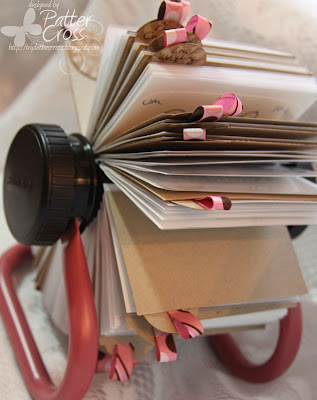 If you want this particular Rolodex, you can
  I do keep a stash of pre-cut ribbons, cards, and circles in a baggie. I also have a note to myself on how I made them so I can quickly make more when I run out. It's easy to make these in mass production!
 Okay, so what are the notations on each individual card? What do they mean, and how does it help me find a stamp?
 The bottom left corner is the name of the stamp manufacturer, and the bottom right corner is the name of the individual stamp or the stamp set name (whichever applies).


 Please