Showing posts with label Photos. Show all posts

Wednesday, March 28, 2012

Oh, the Bluebonnets!

Oh, how I love this time of year in Texas when the bluebonnets come out across the state. Last year they didn't bloom very pretty because of our extreme drought. However, this year, WOW! They are stunning! I just got back from my 55 minute bike ride, and I took 40 pictures. Not sure how much exercise I got in because I kept stopping to take photos. LOL! Here are a few of the beauties I passed on my ride:


And then I think I found a new prayer spot. I have my favorite prayer spot in South Carolina but I really don't have a favorite spot around my home. Well, I found it this morning:


In this spot you hear nothing but the bubbling water and the wild birds. It is absolutely paradise! I just stood there and prayed this morning. Next time I will load up my bike basket with a blanket and my Bible. Just an amazing place of peace and beauty!

Romans 1:19-20 "since what may be known about God is plain to them, because God has made it plain to them. For since the creation of the world God’s invisible qualities—His eternal power and divine nature—have been clearly seen, being understood from what has been made, so that men are without excuse."

I pray these photos bless you today as you are reminded to look at God's creation around you! Have a blessed Wednesday!
Photobucket

Tuesday, November 29, 2011

Tuesday's {Tip} Need a Christmas Card Template?

Okay, first, don't be upset with me when you hear that I do not make my Christmas cards. :) I am so busy, and the "assembly line" thing has never interested me. And in defense of myself, the kids love helping stuff, stamp, seal, etc., the pictures and Christmas letter I write each year. Okay, so now you know that I don't make Christmas cards. What I usually do is create a photo of some sort in Photoshop Elements, and then I write a Christmas letter to go with it. This year, I found some GREAT Christmas card templates. There are several so I could save them all to use in the years ahead. Let's look at what I found through a post on 2Peas.

The ones that are free for your use are from Rebecca Cooper, and they are amazing! You can find this year's templates here. There are 3 of them to choose from. And if you look here, you will find last year's templates along with many other links to free Christmas card templates. So, you have even more to choose from! Lots of great ones to use or save for later use! Thanks Rebecca for such wonderful templates!

Here is the one I chose and how I changed it for our family. These are photos of the kiddos that I loved from this year. Shhhh, don't let my family and friends know I posted this. This is part of what they will be receiving in the mail this year. :)


Oh, and I had them printed at scrapbookpictures.com. I ordered them last Monday, and got them 4 days later!!! I picked the deep matte option, and wow, do I LOVE that!

So, I hope you are able to find a Christmas card template you love. Enjoy putting it together, and have a blessed Tuesday.

P.S. Don't forget to check out the ODBD November Scrapbook Challenge! You have until tomorrow night to get your pages in! I would love to see many, many entries this month! Who doesn't want the chance to win a $20 gift certificate to ODBD? The December releases are a must have, and that GC would be able to help you get the new stamps (see a sneak peak here). :)
Photobucket

Tuesday, August 16, 2011

Tuesday's {Tip} Uploading ALL of Those Vacation Photos

Today I wanted to share a post I did back in 2008. I know I have many new subscribers, and I am not sure how many of you remember this one, and it is something I STILL do with my vacation photos and love. Click the link below to read it:

**Vacation and Photos

I hope you find it helpful, and I will leave you with a couple of photos from this morning's beach ride. Eeek, and this alligator was mad! I think he thought I was going to take whatever it was from him. Do you think it was a rock? That's what my girls and I thought but we are still not sure.


Well, have a joyous day, and to see all of my older Tuesday's {Tips}, look at the link list here. I do need to update it but there are still some great ones there for you. Enjoy the day!
Photobucket

Friday, August 27, 2010

Organizational {Friday} Storing your Printed Photos

Last week I shared how I store my digital photos and how I back them up. If you missed that post, look here. Today I will share how I store my printed photos.

Getting Photos Printed
I have used many printing services over the years, and I have also found my favorites. Unfortunately my absolute favorite printing service is "no longer." It was at my local grocery store, and they used the paper I LOVE, they printed them within an hour (most times within minutes), and it was super easy to pick up my printed photos anytime. Now that they have taken the photo printing service out of the store, I have had to resort to my favorite online printers. While I don't mind sending them to an online service, I dislike having to wait for my photos to show up in the mail. But I have thousands of printed photos waiting to be scrapped so I don't know why I don't mind waiting. It's not like I am going to finish my "back log" anytime soon! LOL!!

Anyway, I am very picky about paper and quality. Luckily, I have found two sites that meet my "picky standards." My two favorite online photo services are Mpix and Scrapbook Pictures. Mpix is my favorite service; however, I hear a lot of people prefer my "second favorite."

When receiving my latest order from Mpix, here is what was in my box:
When you order a large order of prints, they come in this very nice black box. These are perfect for long-term storage of your photos. They are also easy to label, stack, and store! Now, if you order a small amount of prints, they come in these photo-safe envelopes (see it on top of my storage box).
I love these envelopes. I don't know if it's the sound they make when touched or the texture. They are great, and I have always saved them even when I no longer need them because I might decide to send some photos to someone, and I can reuse the envelopes or I use them for professional photos of the kids that I may not scrap.

Other Storage Options
You may not order a large order of prints to get the nice photo boxes from Mpix; however, there are many other storage options available for your prints. My absolute favorite photos storage boxes are made by Creative Memories. They are called the Power Sort storage boxes.

I think this box has been re-done since I have last purchased them because my boxes hold 2,400 photos and this particular box holds up to 1,200 photos. They also used to have a Mini Power Sort Box which I do not see on their site anymore. My boxes hold 12 removable compartments; the mini holds 3, and it seems the new boxes hold 6. Anyway, regardless, it is still a GREAT photo storage box. I love the removable compartments (they hold 400 photo each) along with the dividers. Makes it easy to take to a crop or keep a small group of photos on your desk! These boxes make it VERY easy to store my photos and find what I am looking for. I actually keep some of these boxes stacked under my craft table. I can see the labels easily on each box, and they are within reach when I want to scrap my photos. These are the particular photos I am working on now.
I do not have all of my photos sorted this way. When my favorite grocery store printed my photos, I kept them in the photo envelopes with the negatives and/or CD. I then wrote the date and occassion on the front of the envelope, and then I stored them in date order in the dresser unit in my room. I have several drawers of photos like this:
Of course, there are also photo boxes avilable at Wal-Mart, Target, etc., Regardless of what boxes I use, keeping them by date works best for me.

I hope this has helped a little. I have a LONG way to go in scrapping my photos, and I have a long way to go in getting the drawers of photos into PowerSort boxes. However, what's important to me right now is that I can find what I am looking for, and my photos are safe. Have a blessed Friday everyone!
Photobucket

Friday, August 20, 2010

Organizational {Friday} Storing Your Photos Digitally

Well, after getting back from vacation and taking hundreds of pictures, I thought I would share how I store my photos both on my laptop and how I store my printed photographs. This week we will look at storing digital images and next time we will look at storing printed photos.

Photographs on Your PC or Laptop
Any photos I take, I immediately download them each day as I take them whether at home or on vacation. When I am on vacation, I not only download them to my laptop daily, I also upload them to my favorite photo site for printing and storage. That way I know my photos are safe before we even head home. If something happens to my memory card, my photos are safe. If something happens to my laptop, my photos are safe. I have done this for years, and it has truly been nice to know my photos are backed up elsewhere! You can read my Tuesday's {Tip} on Managing the Photo Mess here for more information.

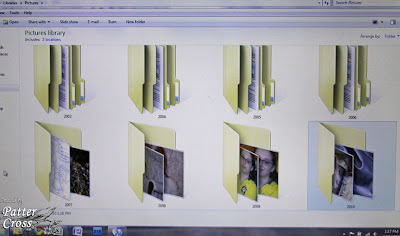
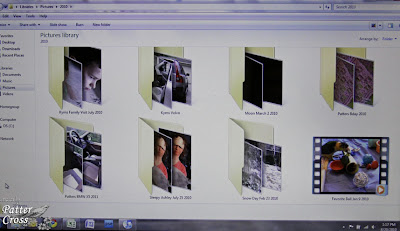
After downloading my photos to my laptop, I organize them into folders in my picture directory. I have "topic folders" and "yearly" folders. Here are some examples of folder names:

**2008
**2009
**2010
**Blog Headers
**BSF
**Design Team Work
**For Sale
**Hobbies
**Scraproom Photos
**Sketches


Next, within a folder, I organize by "event." Sample event names in my 2010 folder include:

**Drivers Permit Day May 25 2010
**Hilton Head August 2010
**Kiwi and Sugar 2010
**Patter's Bday 2010
**Snow Day Feb 23 2010

Now for the pets, I just create one folder for the year and put all of their pictures in that one folder each year. That works well for me.

Naming Images for Storage
For the most part, I keep the original name that the camera assigns each photograph. Only for my design team work and a few other things do I change the name. It makes it easier for me to find a particular card or layout by naming the photo the same name as the piece. I also add an "A" to the end of the file name if the photo has been watermarked and resized for the web. For instance, I may have two file names that look like this:

**BeStillCard
**BeStillCardA

The first file name is the original photographed card; I just renamed the file to the name of the card. The second file name means it is watermarked and resized. So, when posting to online galleries, I know I want to grab the "A" file photo--it will be the correct size for the web and have my watermark on it.

I sure hope all of this makes sense. This is almost one of those posts where I need to do a video though I haven't been able to get to that point yet. This digital storage system has been working really well for me since 2003. I can find photos fairly easily unless I forget what year we did something. Eeeek! :) I also backup my photos and files every couple of weeks on my Western Digital external hard drive. The one I have and love can be found at amazon.com here.

I hope this is helpful in managing your digital files. Be sure to check back next time when I share how I manage my printed images! Have a blessed Friday!
Photobucket

Saturday, June 19, 2010

My Strawberry Girl!

Okay, I had to take a moment to share this photo! This week has been hard on "the girls" (parrots) since it is the first time we have left them for 6-8 hours each day during Vacation Bible School! Well, I left a skewer full of strawberries, corn, and other goodies for them to eat, and look what we came home to:
Yes, Miss Sugar went a little overboard with the strawberries! LOL! You can see a bit on her chest too. It was all over her! Cute little thing! Thanks for letting me share! Blessings,
Photobucket

Friday, January 16, 2009

A Quick Picture! Yes, Bison!!

Can you believe there is a field of bison about 15 minutes from our house? We see them every Thursday on the way to private music lessons. I love seeing them, and I have been meaning to get a picture. Well, yesterday they were close enough for me to get a picture. I was so excited! I think they look amazing! I will use this for my Project 365 picture for yesterday (Thursday). Aren't they neat? Too cool for sure! Thanks for stopping by, and have a blessed Friday!

Tuesday, November 25, 2008

Tuesday's {Tip}

Okay, who doesn't LOVE Pink Paislee? :) Definitely one of my favorite companies. Well, Rebecca has a free holiday card template for you to download. I LOVE it! I was going to mail out a beach photo of my girls for Christmas this year but after having this printed yesterday, the family overwhelmingly agreed that they much preferred our Pink Paislee card! So, I am now having 60 printed and ready to go for Christmas! You can download the template by clicking here. And here is what our card turned out like. P.S. Mom, don't look. Click the close window button. :) Enjoy everyone!

Tuesday, November 18, 2008

Tuesday's {Tip}

Today I wanted to share a recent article I did for Scrapjazz.com. It is an article about taking beach portraits. Now, I know you are probably saying "Patter, it's November. It's too cold for beach photos." Well, some of you lucky readers may be going on a beach vacation for the holiday season. So, this article may help you get those perfect shots. If you are not going on a beach vacation, well, maybe you can bookmark the article and use it next summer. :) At either rate, I pray you enjoy it and get some good tips. You can find my article here. Have a joyous Tuesday everyone!

Monday, September 1, 2008

Happy Birthday Precious Girls!

Today, exactly 14 years ago, our precious identical triplet girls were born! Though each year has brought different medical challenges, we simply cannot imagine not having you in our lives! The Lord strengthens us as we go through each struggle, and He is right here with us watching in awe as you grow and turn into beautiful godly teenagers. You are truly our amazing blessings, and we thank God for all three of you each and everyday! And this year is extra special since we are now homeschooling. How awesome that I can spend even more time with you. I cherish each moment! We love you darling girls! And Happy 14th Birthday!

4 Weeks Old
9 Years Old
August 2008

Monday, August 11, 2008

Tuesday's {Tip}

Vacation and photos! I don't know about you but those two words together always mean work. It's a good thing but I always take a zillion photos on vacation. I think most of us probably do. And by the time I weed through them all to delete the ones I don't want, then upload them to my favorite photo service, get them printed, etc., I have spent several hours getting it all done. Well, I have found a few tips over the years that have really helped to turn this "work" into an easy task. Let's look at what I do to make this less time consuming.

First, I always take my laptop on vacation with me. Then, I have found if I upload my photos every single day from my camera to my laptop, that really helps. Then to streamline it even more and make it less painful, I go ahead and delete the pictures I don't want, and I even upload them to my favorite photo service. I don't send them to be printed just yet but I do get them uploaded to their server. It accomplishes a couple of things. First, it is one task I can check off as "done," and second, it serves as a backup if something happens to my laptop. My photos are now safe in a second location while I am away. As I do these things each day, I know that I won't have to do this when I get home.

Then lastly, the day we leave for home I always have all of the photos printed by my photo service. When I get home, they are ready to pick up, I am ready to scrap, and I don't have to mess with my pictures at all! That was all done on vacation! Yeah! This has made it all SO very easy for me these past few years. You can do this anytime you take a lot of photos--Thanksgiving, Christmas, family vacations, etc. It really does make this task so much easier and less painful.

I pray this has been helpful, and I will leave you with a few pictures I took this week on my bike rides:
Blessings, and have a joyous week!

Tuesday, March 11, 2008

Spring at My House

It was pouring here yesterday but we have had warm weather for a while. As the rain stopped for a bit, I ran out to capture these pictures. I love when everything starts blooming! Enjoy!


Related Posts with Thumbnails